
On 30 March 2026, Ollama announced a preview build that runs on Apple Silicon using MLX, Apple’s machine learning framework, instead of the previous stack path for those Macs. The company frames it as the fastest way to run Ollama on Apple silicon to date, with concrete prefill and decode figures on a named model setup, new NVFP4 quantization support for inference parity with production-style pipelines, and a cache overhaul aimed at coding agents and branching chats. This article summarizes what shipped in the announcement, what hardware Ollama asks for in the preview, and the exact ollama launch / ollama run commands from the post.
What changed in the MLX preview
According to Ollama’s official blog post, the Apple Silicon build is now built on MLX so the runtime can lean on Apple’s unified memory architecture. The narrative is not a cosmetic version bump: Ollama claims a large speedup across all Apple Silicon devices, with additional uplift on M5, M5 Pro, and M5 Max where the stack can use GPU Neural Accelerators for both prefill (prompt processing) and decode (token generation).
The post explicitly calls out workload classes that benefit:
- Personal assistants such as OpenClaw.
- Coding agents such as Claude Code, OpenCode, or Codex-class flows (the page also mentions Pi in the same breath as Claude Code for agent acceleration).
If you are already experimenting with mlx-lm outside Ollama, our earlier walkthrough on Apple Silicon RAM reality remains a useful complement: Run DeepSeek-V4 on Apple Silicon with mlx-lm.
Official demo videos (coding agent and OpenClaw)
Ollama hosts two screen recordings on files.ollama.com that illustrate the MLX preview in real workflows. Clips load directly from Ollama’s CDN; if your CMS strips <video> on import, paste the same URLs as plain download links. .mov playback is best on Safari and recent Chrome on macOS; other browsers may need the file opened locally.
Published performance claims (prefill and decode)
Ollama states tests were run on 29 March 2026 using Alibaba’s Qwen3.5-35B-A3B model, with the new path using NVFP4 quantization and the previous implementation on Ollama 0.18 using Q4_K_M. The blog charts compare Ollama 0.19 against 0.18 for that scenario.
| Metric (blog chart) | Ollama 0.18 | Ollama 0.19 (preview) |
|---|---|---|
| Prefill (tokens/s) | 1154 | 1810 |
| Decode (tokens/s) | 58 | 112 |
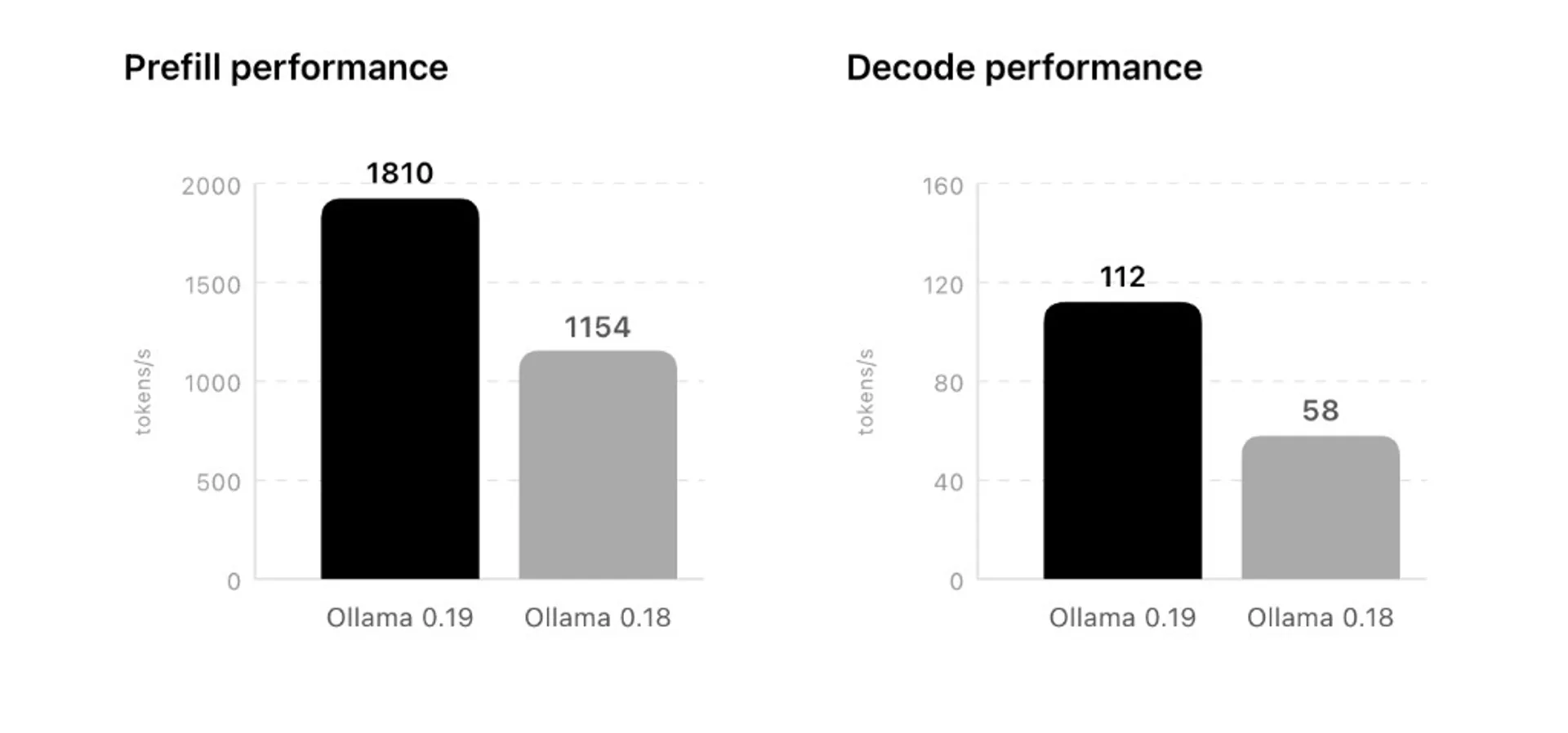
The same post adds that Ollama 0.19 can reach even higher numbers in a cited configuration: 1851 tokens/s prefill and 134 tokens/s decode when running with int4 quantization. Treat these as vendor-reported, model-specific, and harness-specific figures—your machine, OS build, and workload mix will differ.
NVFP4 support and why it matters
Ollama writes that it now leverages NVIDIA’s NVFP4 format to keep model accuracy while cutting memory bandwidth and storage needs for inference. The positioning is explicit: as more cloud inference providers standardize on NVFP4, local Ollama runs can stay closer to production parity in numeric behavior. The post also notes other precisions will follow based on research and hardware partner intent.
Cache upgrades for agents and long sessions
Beyond raw throughput, Ollama highlights three cache behaviors:
- Lower memory utilization: cache reuse across conversations, which should raise cache hits when you branch with a shared system prompt (the post names tool-heavy flows like Claude Code).
- Intelligent checkpoints: snapshots of cache state at “intelligent” points in the prompt to cut repeated prompt processing.
- Smarter eviction: shared prefixes survive longer when older branches are dropped.
For day-to-day agent ergonomics, latency often lives in prefix recompute and context churn—these changes target that class of friction rather than only peak tok/s marketing.
How to try it: download, RAM bar, and commands
The blog’s call to action is straightforward: install Ollama 0.19 from the official download path, and use the Qwen3.5-35B-A3B variant tuned for coding with NVFP4 naming in the tag.
Hardware note from Ollama: use a Mac with more than 32 GB of unified memory for this preview workflow with the highlighted model.
Claude Code:
ollama launch claude --model qwen3.5:35b-a3b-coding-nvfp4OpenClaw:
ollama launch openclaw --model qwen3.5:35b-a3b-coding-nvfp4Interactive chat:
ollama run qwen3.5:35b-a3b-coding-nvfp4Preview releases can change defaults, model tags, and CLI flags. If a command fails after an update, re-check the same blog post and the release notes for your installed build.
Future models and imports
Ollama states it is actively working to support future models under the new path, and plans an easier import path for user fine-tuned models on supported architectures. Until then, expect the supported architecture list to expand iteratively rather than overnight.
Sources
- Ollama Blog — “Ollama is now powered by MLX on Apple Silicon in preview” (30 Mar 2026)
- Ollama CDN — mlx-coding-agent.mov (demo)
- Ollama CDN — mlx-openclaw.mov (demo)
Figures and model names above are transcribed from that post as of its publication date; always verify against the live article before citing in downstream specs or RFPs.

Local AI Masterclass: LLMs, Diffusion & AI-Agents on Your PC
Available at Udemy — practical local-AI learning path (LLMs, diffusion, agents) you can combine with Apple Silicon stacks such as Ollama and MLX. Course title, curriculum, and price can change; verify details on the merchant page before purchase.
Frequently asked questions
Does MLX replace Ollama everywhere, or only on Mac?
The announcement is scoped to Ollama on Apple Silicon in preview. It does not state that Linux or Windows builds now route through MLX.
Will my M1 or M2 Mac see the same 1810 tok/s prefill?
Ollama claims a broad Apple Silicon speedup, but the charted numbers in the post come from a specific model and quantization setup compared across 0.18 and 0.19. Expect different absolute numbers on other chips and memory tiers.
Why does Ollama ask for more than 32 GB unified memory?
The blog sets that bar for the preview workflow with Qwen3.5-35B-A3B at the highlighted precision—roughly the same class of constraint you would expect for a 35B-class model with headroom for KV cache and desktop multitasking.
Is NVFP4 only relevant if I use NVIDIA hardware locally?
Here NVFP4 is framed as a quantization format for inference that aligns with wider provider-side adoption—not as a requirement that your Mac contain an NVIDIA GPU. The post positions it around accuracy and bandwidth tradeoffs on Apple Silicon in this preview.