Most people treat Claude like a faster search box. That works for errands. For skills that stick, you want a workflow: constraints, feedback loops, and artifacts you can reuse next week.
Coach mode vs. chat mode
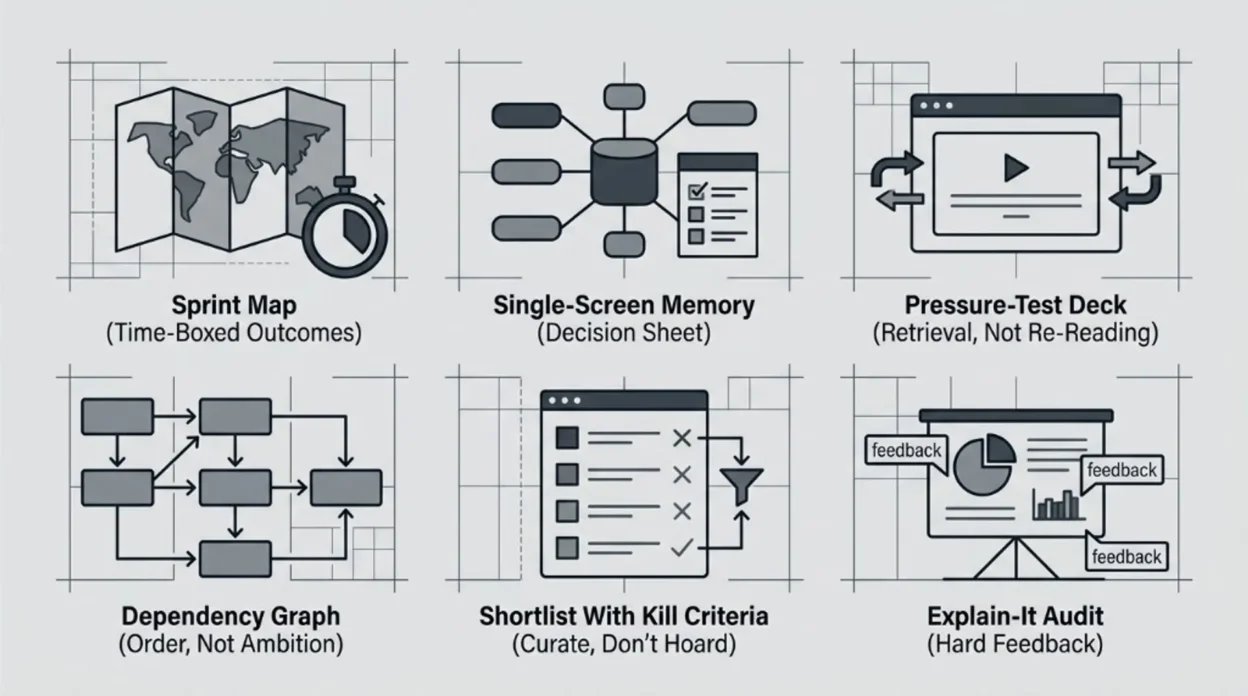
Chat mode asks for one answer and moves on. Coach mode asks for structure you execute: a plan you can check off, a sheet you keep open, a quiz that updates as you improve, a map of prerequisites, a shortlist with reasons, or an adversarial pass on your explanation.
If you are still choosing between assistants for daily work, read Claude vs ChatGPT. If you need vocabulary first, tokens, context, and RAG and what generative AI is stay the shortest on-ramps.
1. Sprint map time-boxed outcomes
Beginners rarely fail from lack of motivation. They fail from fuzzy scope: ten tabs open, no finish line, no definition of “good enough for Tuesday.”
Ask Claude for a sprint map: a calendar-shaped plan with outcomes, not topics. Include what to defer on purpose so you do not pretend every sub-skill is equally urgent.
Pattern: “I have [hours per week] for [number of weeks]. Target skill: [topic]. Starting level: [honest baseline]. End state: [one observable outcome]. Build a week-by-week plan with weekly deliverables, explicit non-goals, and the three fastest ways beginners waste time here.”
Save the output somewhere boring: a doc you reopen every Monday. The win is constraint, not inspiration.
2. Single-screen memory decision sheet
Long notes age badly. Under pressure, you need retrieval cues: rules of thumb, failure modes, and “if this, then that” branches you can scan in one glance.
Pattern: “Design a single-page reference for [topic] meant for someone who will forget details. Use: (1) five ‘when to use / when not to use’ rules, (2) a tiny glossary of terms that get misused, (3) a ‘red flags’ box for common wrong answers, (4) a 10-line ‘emergency recap’ I can read in 45 seconds. Keep it tight; no essays.”
Print it or pin it beside the monitor. The point is fast recall during doing, not archiving.
3. Pressure-test deck retrieval, not re-reading
Re-reading feels productive. Cognitive science has spent decades showing why that feeling lies. Retrieval practice — pulling knowledge out with questions — tends to beat passive review on delayed tests; see Roediger and Karpicke’s work on test-enhanced learning in Psychological Science (2006).
Use Claude as the question author and grader, not the textbook.
Pattern: “Build a 20-question deck on [topic] for my level: [beginner / intermediate]. Mix recall, small scenarios, and two ‘trap’ questions. After each wrong answer, give a two-sentence correction plus one follow-up question. When I miss three in a row, stop and assign a five-minute micro-review before continuing.”
Short sessions beat heroic cramming. The deck should get harder only when your answers earn it.
4. Dependency graph — order, not ambition
People quit when the curriculum is a wall. What they need is stairs: each step unlocks the next without smuggling in hidden prerequisites.
Pattern: “Model [topic] as a dependency graph: nodes = concepts, edges = ‘must understand A before B.’ Start from absolute zero. For each node, add one sentence on why it matters and one five-minute check I can do to prove I got it. Flag any node that is optional for my stated goal: [goal].”
Use the graph to refuse guilt: skipping optional nodes is a strategy, not laziness.
5. Shortlist with kill criteria- curate, don’t hoard
More resources rarely fix confusion. Better filters do: what to start with, what to skip until later, and when to abandon a source that is dragging you sideways.
Pattern: “Propose exactly five resources to learn [topic] for someone with [constraints]. For each: format (book / course / docs / video), best first step inside it, and kill criteria — when I should stop and switch. End with a 14-day sequence that uses at most two resources at a time.”
Force the cap at five. Abundance is the enemy of completion.
6. Explain-it audit — hard feedback
The Feynman-style move is simple: if you cannot explain it cleanly, you probably do not own it yet. The twist here is to let Claude be impolite on purpose- interrupting jargon, demanding definitions, and mapping gaps after you finish.
Pattern: “I will explain [topic] in [~300 words] for a smart reader outside the field. Rules for you: interrupt with [STOP] the first time I hand-wave, use undefined jargon, or smuggle in a black box. After my text, output: (1) what was solid, (2) what was fuzzy, (3) three micro-drills to fix the fuzziest part.”
Type the explanation first; do not let Claude draft it for you. The muscle under training is your compression, not its.
Rules that keep you honest
- Verify facts. Claude can be confidently wrong on dates, law, medicine, and prices. Cross-check anything that would embarrass you in public.
- Prefer primary docs for technical subjects (official specs, standards, vendor docs) over random explainers.
- Keep artifacts. If nothing survives the session as a file or checklist, you did expensive brainstorming, not learning.
- Rotate modalities. Plan → sheet → quiz → explain → shortlist. Different moves catch different holes.
Pick one topic you have been avoiding. Run it through two moves this week and two next week. Momentum beats novelty.
Frequently asked questions
Do I need Claude Pro for this?
No. These workflows work on the free tier with smaller context and tighter rate limits. Pro helps when you attach long PDFs or run many back-to-back quiz rounds. Check Anthropic’s current limits on your account type before you plan a marathon session.
Is this the same as “prompt engineering”?
Prompt engineering optimizes one-shot outputs. These patterns optimize loops: you return with new answers, new errors, and new constraints. The artifact (plan, sheet, deck) matters as much as the wording.
Can I use ChatGPT or Gemini instead?
Yes. The moves are model-agnostic; the discipline is not. Different tools differ on attachments, citations, and default safety refusals — adjust the pattern if the model pushes back on “trap” questions or role-play grading.