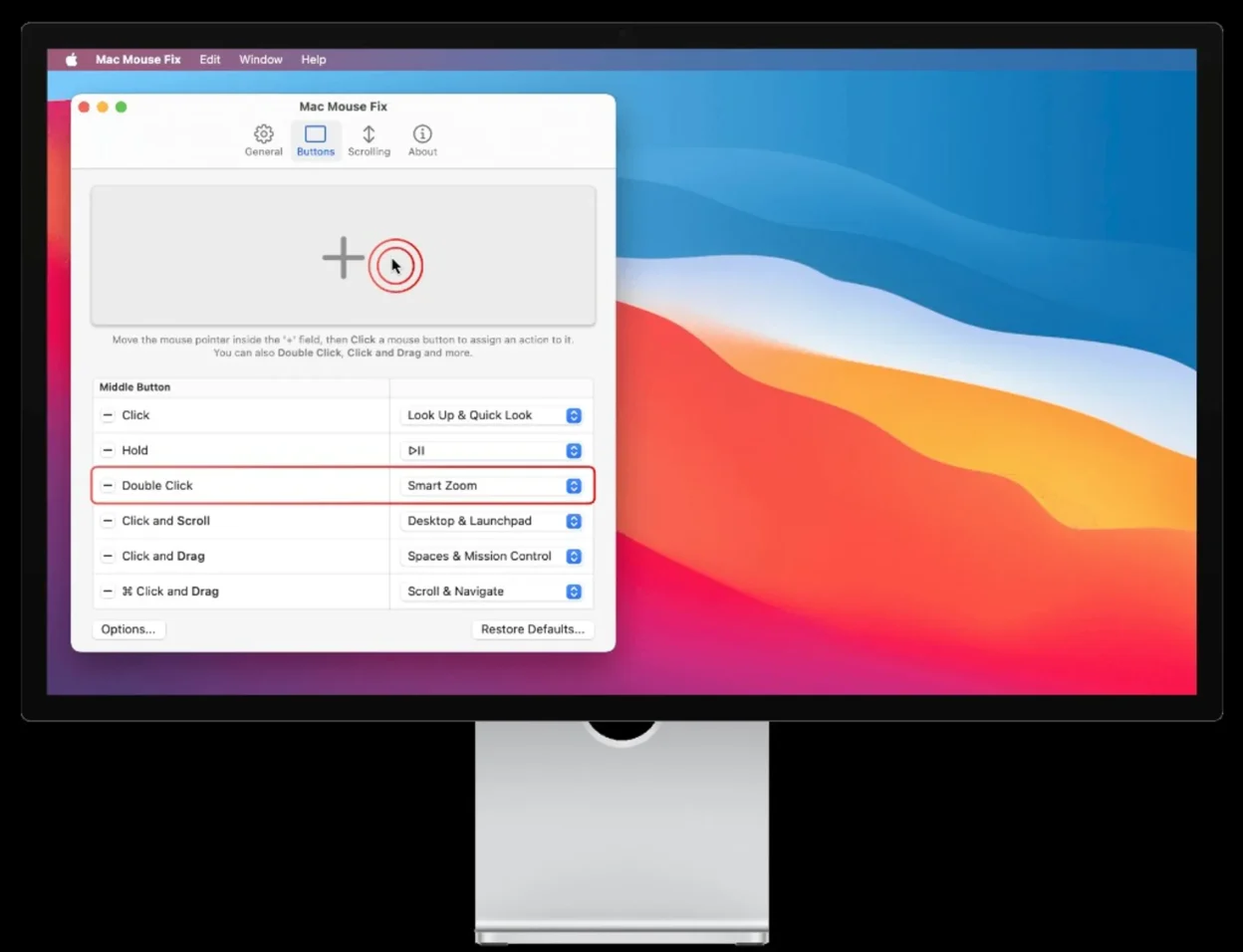
Mac Mouse Fix is a macOS utility by Noah Nuebling for one job: make a non-Apple mouse feel easier to control and closer to a Trackpad smoother wheel scrolling, per-button actions, and (when your hardware has enough buttons) gestures for Mission Control, switching desktops, and similar. A purchase button for the paid 3.x license is at the top; everything below is a straight explanation of what the app does.
What problem it solves
Wheel scrolling on macOS with many third-party mice feels choppy or hard to pace next to a built-in Trackpad or next to what people remember from Windows. A lot of desk setups still prefer a mouse for ergonomics or fine pointing. Mac Mouse Fix targets that gap in software: same physical mouse, different scroll and gesture layer.
Smooth scrolling and extended gestures
Hardware first: the publisher states the full Trackpad-style gesture set assumes at least five buttons (left, right, wheel click, two side buttons). Fewer buttons still work; you have fewer physical inputs to assign. Apple Magic Mouse is currently unsupported. Mice that hide behind proprietary drivers (some Logitech Options-style stacks) may not expose every button – verify in the trial.
Momentum scrolling (what “smooth” means)
Third-party wheel scrolling on macOS is often described as stuttery or hard to pace. Mac Mouse Fix replaces that with a momentum-based algorithm and three headline presets on the official page:
- Smoothness: High closest to a glass Trackpad: long coast, subtle bounce at the end of a page, still meant to stay controllable for long documents.
- Smoothness: Regular shorter momentum, closer to scrolling in Chrome or many modern Windows apps: responsive, less floaty.
- Smoothness: Off no scroll animation; each wheel detent advances a fixed number of lines instead of a few pixels, similar to many Windows/Linux apps and older macOS feel.
You can set mouse scroll direction independently from the Trackpad or Magic Mouse, hold keyboard modifiers while scrolling for precision nudging and zoom, and turn each scrolling enhancement off if you want stock macOS wheel behavior.
Button 4 as a gesture surface
On a typical five-button mouse, button 4 (often the front side button) mirrors four-finger Trackpad moves:
- Mission Control- hold button 4, drag up.
- Move between desktops / fullscreen spaces- hold button 4, drag left or right.
- App Exposé- hold button 4, drag down.
- Show Desktop- hold button 4, scroll up.
- Launchpad- hold button 4, scroll down.
- Look up and Quick Look — a single click on button 4 for dictionary lookup, Safari link preview, Finder Quick Look, and related peek behaviors (same family as a three-finger tap or Force Click on a Trackpad).
Button 5: zoom, navigation, canvas moves
Button 5 carries a second vocabulary:
- Zoom in Safari / Preview- hold button 5, scroll up or down (pinch analogue).
- Back and forward- hold button 5, drag left or right in supported apps.
- Mail and in-app swipes- same pattern for swipe actions inside Mail, quick replies in Messages, and other Trackpad-driven swipes.
- 360° scroll- hold button 5 and drag in any direction with inertia for canvas navigation in pro apps.
- Smart Zoom- a click on button 5 toggles smart zoom in webpages or PDFs (two-finger double-tap analogue).
Video demos
Keyboard shortcuts from the mouse
Beyond canned gestures, Mac Mouse Fix advertises firing any keyboard shortcut macOS accepts copy, paste, brightness, volume, Mission Control hotkeys, new Safari tab, and so on — so the mouse becomes a macro layer without leaving the pointer on screen.
Install and license
Paid 3.x license: use the Gumroad button at the top — that is the storefront the developer uses for checkout and license delivery.
Package managers: if you already use Homebrew, the project readme documents:
brew install mac-mouse-fix(No link here on purpose — you are reading a copy-paste command, not a referral to another site.)
Uninstall: drag the app to the Trash. The author suggests a third-party uninstall helper (named in their readme) for leftover preference files; macOS rarely lets apps delete every support file automatically.
macOS, chips, and mouse limits
From the project’s published compatibility notes:
- Current 3.x builds target macOS 11 Big Sur and newer.
- Catalina, Mojave, High Sierra: stay on Mac Mouse Fix 2; 3.0.0 and newer may show UI issues or partial features.
- Sierra and El Capitan: cap at 2.2.0 or older.
- Apple Silicon: the FAQ states the app runs fully native.
Pointer acceleration: Mac Mouse Fix does not disable macOS pointer acceleration. From macOS 14 Sonoma onward you can turn acceleration off in System Settings → Mouse → Advanced → Pointer acceleration.
Per-app behavior: version 2 exposed app-specific toggles; version 3 is still catching up. Documented workaround: show the app in the menu bar and flip smooth scrolling when a single app misbehaves.
License, trial, and privacy (checkout confirms)
Buyer reviews and sales volume: on the public Gumroad listing as of April 2026, storefront counters show roughly 4.9 out of 5 stars from user ratings and nearly 40,000 reported purchases. Gumroad can update those figures anytime, so treat this as a snapshot and verify on the live product page before you pay.
The publisher advertises a roughly thirty-day trial where days count only when you actually launch the app, then a one-time purchase on the order of a few dollars before tax. We do not mirror live pricing in text — open the Gumroad listing above and read the line item before you pay.
- 3.x license is described as valid for all Macs you personally use, with optional license sync through the same Apple Account on iCloud.
- Publicly shared license keys are against the rules and may be revoked; private household use is described as acceptable.
- Version scope: a 3.x license is intended to cover 3.x updates; a future major version might need a new purchase if development costs force it.
- Privacy: the app itself is described as ad-free with no routine personal data collection while it runs. Checkout happens on Gumroad, so email and payment metadata are handled under Gumroad’s privacy policy.
- Older 2.x remains free forever if you only need legacy macOS support.
Open source: the codebase is public under terms the author publishes; that is separate from the paid license for the prebuilt 3.x app.
Who should buy- who should not
Worth buying if you want Trackpad-like scroll polish and button-driven navigation on a multi-button mouse you already own, and you accept a short trial before a small one-time fee (via Gumroad, as above).
Skip it if you live on the Trackpad, use a Magic Mouse, or only need to flip natural scrolling — macOS already exposes that.
Reality check: competing remappers and premium mice with bundled drivers exist. Mac Mouse Fix is pitched as cheap, small in scope, and inspectable. Let the trial prove it on your desk before you spend anything.
Mac Mouse Fix on Gumroad — same listing as the button at the top. If anything in this guide disagrees with the product page or checkout, trust the Gumroad screen.
Frequently asked questions
Is it safe to run?
It is open source, which means the code can be reviewed. Any mouse remapper needs broad accessibility permissions on macOS — only grant those after you trust what you installed. For the paid build, follow whatever download or activation steps Gumroad and the app show you after checkout.
Will my mouse work?
Most plain USB and Bluetooth mice behave well. Proprietary gaming or office stacks that hide buttons behind custom drivers are the usual failure mode. Use the trial: if every click registers in the app, you are fine.
Why does a click feel slightly late?
The project FAQ explains that the helper may wait briefly to see a double-click. Remove double-click actions from that button if the delay bothers you.
I donated years ago on PayPal — free license?
The maintainer has described a donor path for past PayPal supporters. That process lives in their own documentation bundle; follow the instructions in the project readme or support flow linked from the official site.
Version 2 versus 3?
2 stays free for older macOS. 3 is the current line with trial plus paid license. Feature tables move with releases — again, confirm in-app or at checkout, not from a static blog mirror.